 Dodaios
 On the machine we build Personal Jarvis on, an agent can be handed 200 different tools. Two MCP servers bring 77 of them. Ask Jarvis about tomorrow’s weather, and none of those 77 reach the model. Ask it to open a pull request, and 45 do.
Skills, plugins and MCP servers are three words that get mixed up a lot. In Jarvis they are three different things, and they all end up in the same place: one catalog that every agent takes its tools from. This post covers what each of the three is, how an agent gets its share, why a connected MCP server stays quiet until a request is about it, and what broke on the way.
Three things, one catalog
- A skill is text. A short Markdown file,
SKILL.md, that tells the assistant how to do one task: the steps, what to check first, when to ask. A skill cannot do anything on its own. It tells the model how to use the tools it has. - A plugin is a connection to a service. GitHub, Notion, Slack, Google Calendar. Installing one means signing in once, and Jarvis keeps the sign-in in your system’s keyring.
- An MCP server is a program that offers tools in an open format, the Model Context Protocol. Many apps can use the same server. You can add one yourself, and most plugins bring one along.
All three land in one place: the Plugins / Skills / MCP section of the app, with a tab for each.
One section for all three
The Plugins tab on our machine: 46 plugins in the store, 19 installed, 4 waiting for a fresh sign-in.
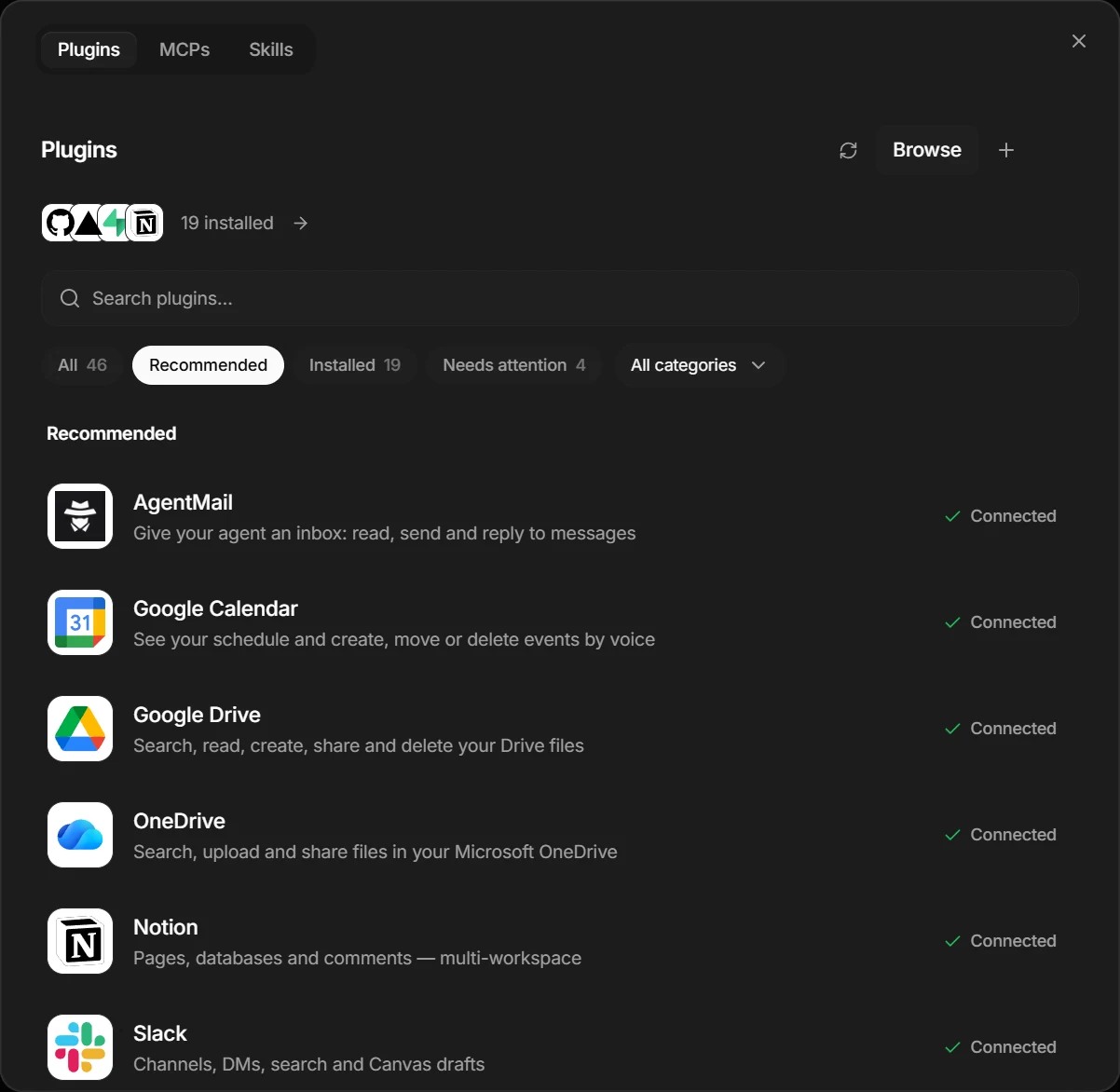
Behind that section, Jarvis gives every tool from every source one name: plugin:gmail, mcp:github/create_pull_request, skill:humanizer, cli:gh. Command-line tools you have connected, like gh or gcloud, and a few basics like the wiki and the browser join the same list. That list is the catalog.
Three sources, one catalog, four steps per agent
How a skill, a plugin or an MCP server becomes a tool an agent can call. Counts from our machine.
Swipe sideways to see the whole chart.
Show the data
| Step | What happens |
|---|---|
| Catalog | 200 capabilities, one id each |
| 1 Grant | all of them, or an allow-list |
| 2 Deny | minus anything you blocked for this agent |
| 3 Focus | the agent's main tools move to the top of the list |
| 4 Per turn | MCP tools only when the request is about them |
What is in the catalog
When we counted on October 1, the catalog held 200 capabilities. The largest group is not the plugins. It is the MCP tools: 45 from GitHub, which connects through GitHub’s own MCP server, and 32 from NotebookLM, an MCP server we added by hand.
Two MCP servers bring 77 of the 200 tools
Every capability in the catalog on our machine, by kind. The MCP row is split by the server the tools come from.
Swipe sideways to see the whole chart.
Show the data
| Kind | Count | Of which |
|---|---|---|
| MCP tools | 77 | GitHub plugin (hosted MCP server): 45, NotebookLM (MCP server we added): 32 |
| Jarvis tools | 70 | Connected: 67, Sign-in missing: 3 |
| Skills | 33 | Skills: 33 |
| Built-in basics | 11 | Wiki, browser, contacts and more: 11 |
| Command-line tools | 9 | gh, gcloud, aws and more: 9 |
Every capability also carries a risk tier. 172 of the 200 are monitor: they run and show up on the activity board. 18 are ask, such as calling a contact, installing a plugin or deleting a skill, and wait for your approval. 10 are safe, such as reading the wiki.
Plugins: one approval in the browser
A plugin should not need a developer to set it up. Installing one opens the service’s own sign-in page in your browser, you approve once, and the plugin is connected. You never copy a client ID or create a developer app.
42 of 46 plugins connect with one approval in the browser
Every plugin in the store as one square, twice: how you sign in, and what the plugin brings.
Swipe sideways to see the whole chart.
Show the data
| Plugins | |
|---|---|
| Sign-in: Browser sign-in (OAuth) | 24 |
| Sign-in: Browser sign-in at the service's own MCP server | 16 |
| Sign-in: Code shown on a second device | 1 |
| Sign-in: Sign-in on your own server's page | 1 |
| Sign-in: Pasted access token | 3 |
| Sign-in: Nothing to sign in (local) | 1 |
| Brings: An MCP server | 38 |
| Brings: A tool built into Jarvis | 6 |
| Brings: A chat channel | 2 |
38 of the 46 plugins carry an MCP server. Most of those are servers the service runs itself, such as GitHub’s, Notion’s or Linear’s. So for most plugins, “installing a plugin” means: sign in once, and Jarvis connects to that service’s MCP server with your sign-in. The other eight are tools built into Jarvis, like Google Calendar and Spotify, and the two chat channels Telegram and Discord.
Plugins are packaged in the open Agent Plugins format: a plugin.json, and an mcp.json when there is an MCP server. Everything only Jarvis needs, like the sign-in flow and the logo, sits in a separate section that other apps ignore.
Skills: the manual that comes with each plugin
51 skills ship with Jarvis. 45 of them belong to exactly one plugin. They are its manual.
45 of 51 built-in skills are the manual for a plugin
Every skill that ships with Jarvis as one square, by what it is for.
Swipe sideways to see the whole chart.
Show the data
| Skill | Count |
|---|---|
| Manual for one plugin | 45 |
| Guide for a CLI or an API | 2 |
| Plain instructions | 4 |
A plugin’s manual is short. This is the whole body of the GitHub one:
Use the connected GitHub tools to inspect and act on the user's repos,
issues, and pull requests.

- Read-first: list/search issues or PRs before acting; reference items by number.
- Confirm before destructive/consequential actions (merging, closing).
- Summarize plainly: title, number, state, author. Keep raw ids out unless asked.
Its header names the plugin it belongs to, the words that point to it (“repo”, “pull request”, “issue”, and their German forms), and its risk tier, ask. When you connect the plugin, those words start routing requests to it. When you disconnect it, they stop.
Every skill has its own switch
The Skills tab on our machine: 34 skills. A microphone means it can be started by voice, a clock means it runs on a schedule.
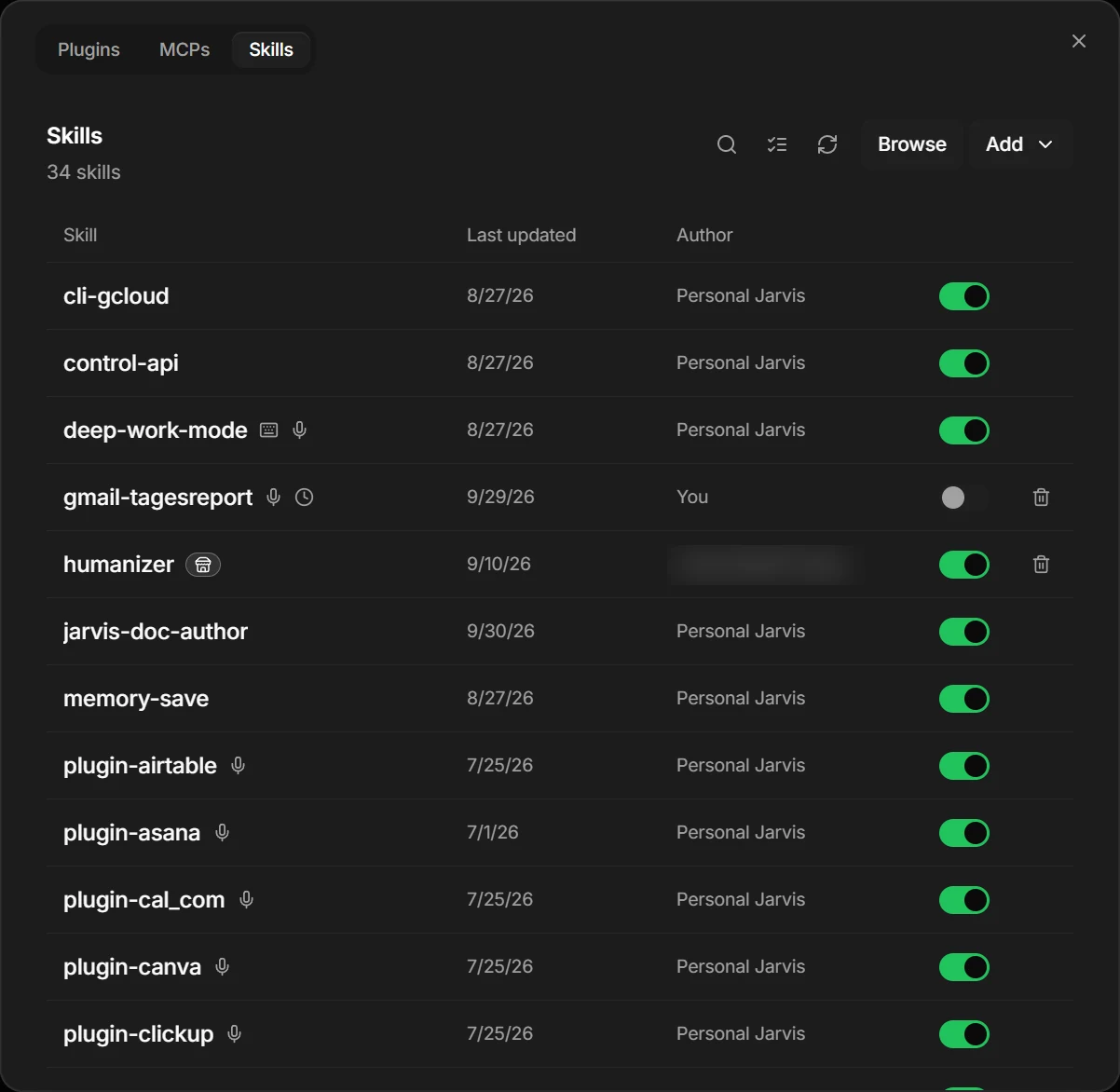
A skill finds its way into a turn in two ways. Its own words can match what you said, and a paraphrase counts too: a scorer reads the words the skill’s author already wrote down and ranks every skill in about 75 microseconds, with no model call. Or the model asks for it by name.
Matching a skill is cheap. Letting it take over a turn is not, so Jarvis decides that from what the skill does, not from what it claims:
- A skill that only adds instructions may take over a turn by itself.
- A skill that uses tools, like every plugin manual, may join a turn only while the model can still decline it.
- A skill that starts a background job never fires by itself. You name it, or the model asks for it.
Skills from elsewhere work too. A SKILL.md written for Claude Code, Codex or Cursor installs in Jarvis, and the install dialog shows you its full text first, because the text is the skill. Jarvis keeps only its name, description and other descriptive fields. Anything that would grant behaviour, such as triggers, a lower risk tier or a background job, is dropped and listed on the skill so you can see what was ignored.
MCP servers: add your own
You can add any MCP server in the MCPs tab, either one that runs on your machine or one at a web address. Jarvis checks that the server answers, lists its tools and switches it on.
An MCP server we added, with its 32 tools
The MCPs tab on our machine. Each server can be switched off without being removed.
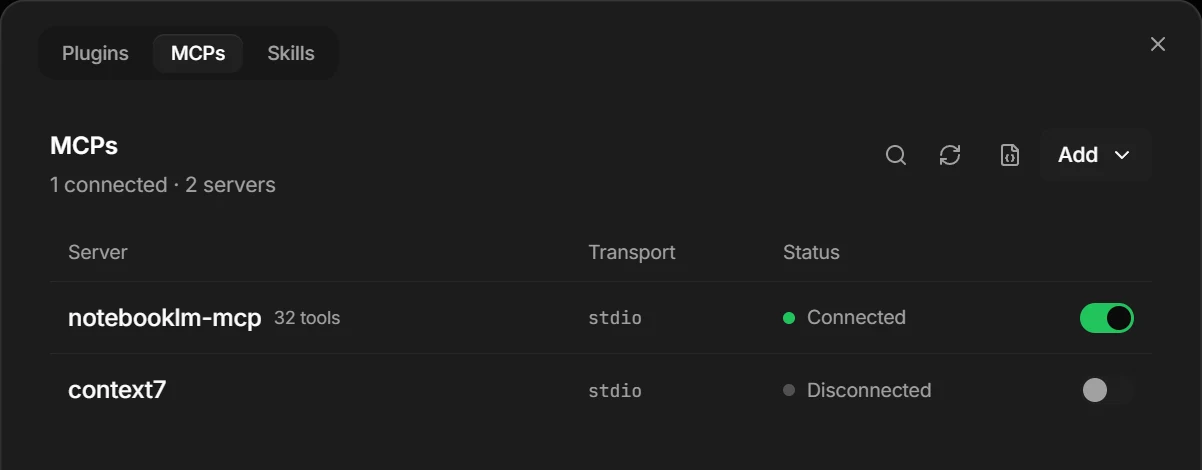
An MCP server can hold a lot of tools. NotebookLM alone has 32: create a notebook, add a source, make flashcards, a mind map, a podcast. If every one of them went to the model on every turn, the list of tools would grow with each server you add, every turn would get slower and more expensive, and the model would be more likely to pick the wrong one.
Connected does not mean offered
So before every turn, Jarvis checks each MCP server against what you just said. A server’s tools are offered only if one of these holds:
- you name it (“NotebookLM”, “notebook lm”),
- its usage card matches (GitHub’s lists “pull request”, “issue”, “repo”),
- or a distinctive noun from its own tools appears in your request. NotebookLM’s tool
flashcards_creategives it the word “flashcards”.
There is no model call in this check. It is plain word matching, so it costs nothing and works with any provider. We ran the shipped check over our catalog’s 77 MCP tools for seven example requests:
An MCP server reaches the model only when the request is about it
How many of the 77 MCP tools on our machine the shipped per-turn check would offer for each example request.
Swipe sideways to see the whole chart.
Show the data
| Request | MCP tools offered | Servers |
|---|---|---|
| What's the weather in Berlin tomorrow? | 0 of 77 | none |
| Find me a flight to Lisbon on Friday | 0 of 77 | none |
| Put lunch with Anna on my calendar for Friday | 0 of 77 | none |
| Make flashcards from my biology notebook | 32 of 77 | notebooklm-mcp |
| Build a mind map about the French Revolution | 32 of 77 | notebooklm-mcp |
| Which issues are still open in the website repo? | 77 of 77 | github, notebooklm-mcp |
| Open a pull request for the login fix | 45 of 77 | github |
Six of the seven requests get exactly what they should. The flight question gets nothing, which is the point: an earlier version offered NotebookLM’s tools on a flight question, the model called one of them, and the turn lost about 35 seconds until the call timed out.
The issue question shows a gap we have not fixed yet. “Which issues are still open in the website repo?” rightly gets GitHub’s 45 tools. It also gets all 32 of NotebookLM’s, because one NotebookLM tool adds a website as a source, and so “website” counts as one of its words. The model can ignore them, but they are 32 tools it did not need.
How an agent gets its share
Every agent in Jarvis takes its tools from the same catalog, in four steps on every turn:
- Grant. By default an agent gets everything the global safety rules allow. You can narrow it to a short allow-list.
- Deny. Anything you blocked for this agent is removed. So is every tool that is not connected right now. An agent never sees a tool that would only answer “not available”.
- Focus. The agent’s main tools move to the top of the list, and the agent is told in its instructions that these are its own. The rest follow in a fixed order, so the list is the same on every turn and providers can cache it.
- Per turn. The MCP check from above.
Focus is set once, when you create the agent, by matching its name and description against the catalog. No model is involved. Describe an agent as “a daily overview of my Gmail inbox”, and it gets plugin:gmail as its focus. It keeps every other tool too, so it can still check the calendar or look something up in the wiki.
That agent exists on our machine. When we measured, its Gmail sign-in had expired, so for that moment the agent had no Gmail tools at all. That is on purpose: a tool that cannot work is not offered. The Plugins tab shows the sign-in under “Needs attention” until it is renewed.
Some tools never reach any agent: the tools that start background workers, switch providers, add MCP servers or control the app. An agent can do work. It cannot hire more workers or rebuild the house it lives in.
Agents also write skills of their own. When an agent finishes a task and a repeatable procedure came out of it, Jarvis writes that procedure down as a skill in the agent’s own folder. It is active for that agent right away, and you can promote it to all of Jarvis, where it starts as a draft. Our agents have written 8 so far.
MCP in the other direction
Jarvis does not only use MCP servers. It is one, twice.
- For its own agents. An agent can run on a Claude Code or Codex subscription instead of an API key. That CLI brings its own shell and editor, and it reaches Jarvis’ tools over MCP, through a server Jarvis runs for that session. The same approval rules apply.
- For other apps. Claude Desktop, Cursor, VS Code, Codex or a second Jarvis can connect to your team over MCP. Twenty-four tools let them see the agents, talk to one, post a job without naming who should do it, and answer approval requests. Each app gets its own key, and nothing that needs your approval gets past it.
What broke on the way
- The NotebookLM flight question. A connected MCP server used to be offered just because it was connected. A plain flight question once called
notebooklm-mcp/chat_configureand waited about 35 seconds for it. The fix is the check described above, with a list of generic words like “create”, “list” and “report” that never count as a signal. - “repo” inside “report”. The GitHub skill’s pattern once fired on “report” and “reporter”. Word boundaries in the pattern fixed it. The calendar skill had the same problem with the German word “Termin” inside “Terminals”.
- One spelling let spawn tools through. The list of tools no agent may have was written as
spawn-worker, while the tools register asspawn_worker. For a while that mismatch let every spawn tool into agents’ lists. The list now matches either spelling.
If you use Jarvis
- Install the plugin, not just the MCP server. A plugin brings the sign-in and the manual. A bare MCP server brings only the tools.
- Name the service when it matters. “In NotebookLM, make flashcards” always reaches it, even when your wording would not.
- Describe an agent by what it owns. A description that names the service, like Gmail or GitHub, sets the agent’s focus at no cost.
- Watch “Needs attention”. An expired sign-in silently takes those tools away from every agent until you renew it.
- Read a skill before you install it. The install dialog shows the full text. That text is all the skill is.
The rules behind this post are written down in the repository: the agent definition, portable skills, the plugin format and the agent MCP surface. If a tool shows up where it should not, or stays away when it should come, open an issue on GitHub.
How we measured. All counts come from the Personal Jarvis desktop app on the Windows machine it is built on, read on October 1, 2026 from its local API: the capability catalog (/api/society/capabilities), the plugin store (/api/marketplace/plugins) and the skills list (/api/skills). Your catalog will look different: it depends on what you install and connect. The built-in skill count is from the repository’s jarvis/skills/builtin/ folder on the same day. Figure 8 runs the shipped function filter_plugin_tools from jarvis/marketplace/plugin_relevance.py over the catalog’s 77 MCP tools, with each tool’s one-line description standing in for its full description; the seven requests are examples we wrote, and no model was called. Only counts and tool names left the machine. The screenshots are of the same app on the same day, with one author name blurred.