 Dodaios
 On September 29 our desktop app connected to the same background process 24 times. Every one of those was a fresh start of the app, most of them restarts to pick up a fix. Between 9 and 13 coding agents were working through all of it, and none of them noticed.
The next morning, the PC had been off all night. When the app started, it resumed all 13 agents, each in its own conversation, without typing a word into any of them.
Both of those are new in Personal Jarvis, and they are two different mechanisms. This post covers why our agents used to die with the app, how the part that keeps them alive works, how the part that brings them back after a restart works, and what broke while we built them. In this post, “we” means the people building Personal Jarvis and the coding agents that do much of the typing; we lived with the old behaviour longer than anyone.
Agents used to be children of the app
Until September 28, every coding agent in a Jarvis pane was a child process of the desktop app. Everything that ended the app ended the agents with it: closing the last window, Quit in the tray, an update, a restart to pick up a fix.
At best, a pane came back through the CLI’s own --resume flag. That reopens the conversation, but it is a fresh process that re-reads its history and has forgotten what it was in the middle of. For a team that restarts its own app two dozen times a day, that meant interrupting every agent two dozen times a day.
Layer one: the agents live in their own process
The fix has the same shape as tmux, the terminal multiplexer many developers already use for exactly this reason. A small, long-lived process owns the terminals, and the app is only a client that attaches to them. Closing the app detaches. Opening it again re-attaches to the same processes, including everything they printed in the meantime.
We call that process the PTY host (a PTY is the pseudo-terminal a command-line program runs in). It is deliberately small:
- It starts the terminals and keeps a replay buffer of each one’s recent output, so a returning app can redraw the screen exactly as it is now.
- It talks to the app over one loopback connection on your own machine, authenticated with a random token. Only one app can be attached at a time; a new one replaces the old one, which is exactly what a restart looks like from the host’s side.
- It knows nothing about workspaces, layouts or which agent is which. All of that stays in the app. The host only knows terminal ids.
- With no terminal alive and no app attached for 60 seconds, it exits by itself, so a closed app never leaves a process behind for long.
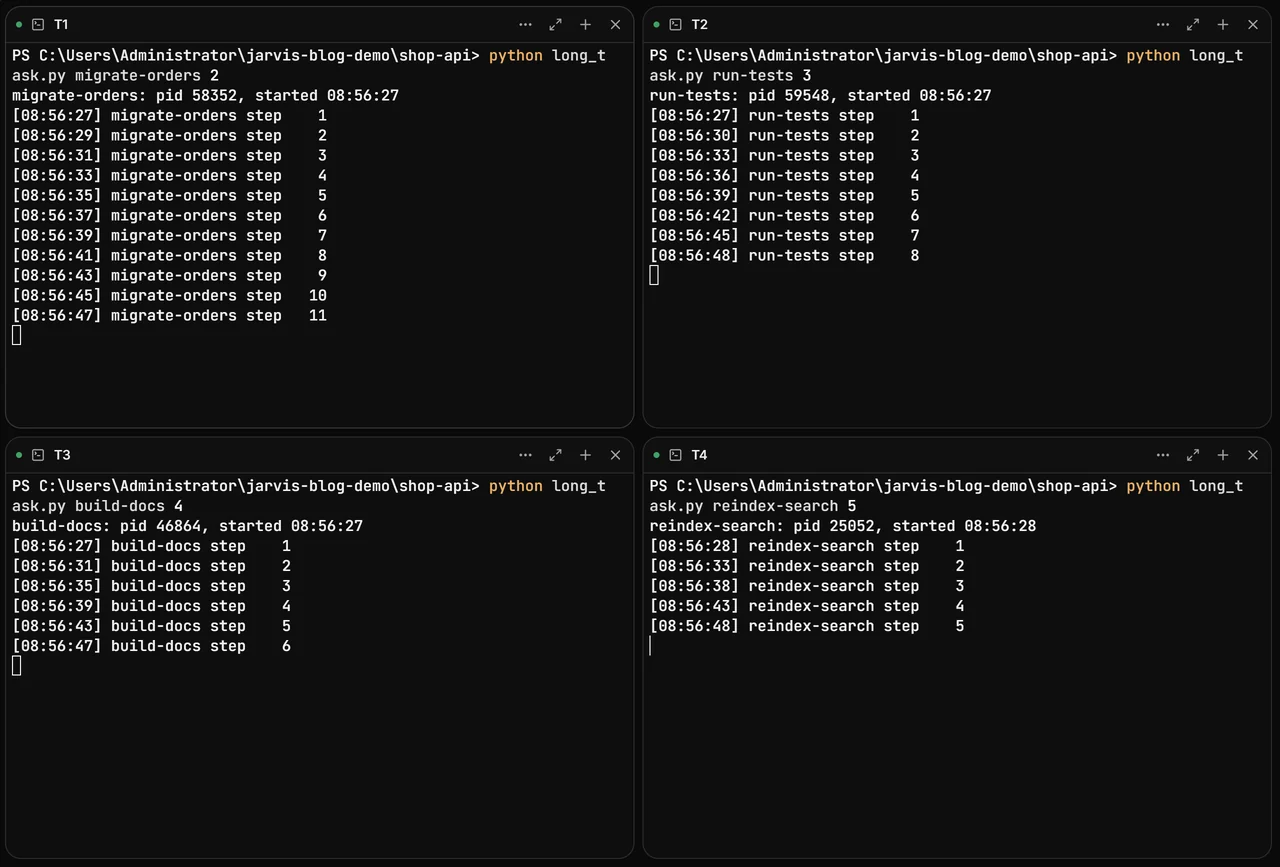
We tested it the way you would use it. In a demo folder we opened four terminals, each running a small script that prints a numbered step every few seconds. Then we closed the app for a minute and a half and opened it again.
Before closing the app: four long tasks, a few steps in
Each script prints its process id and a numbered step every 2 to 5 seconds.
After reopening: the same processes, still counting, no step missing
Jarvis had also given the panes descriptive titles in the meantime.
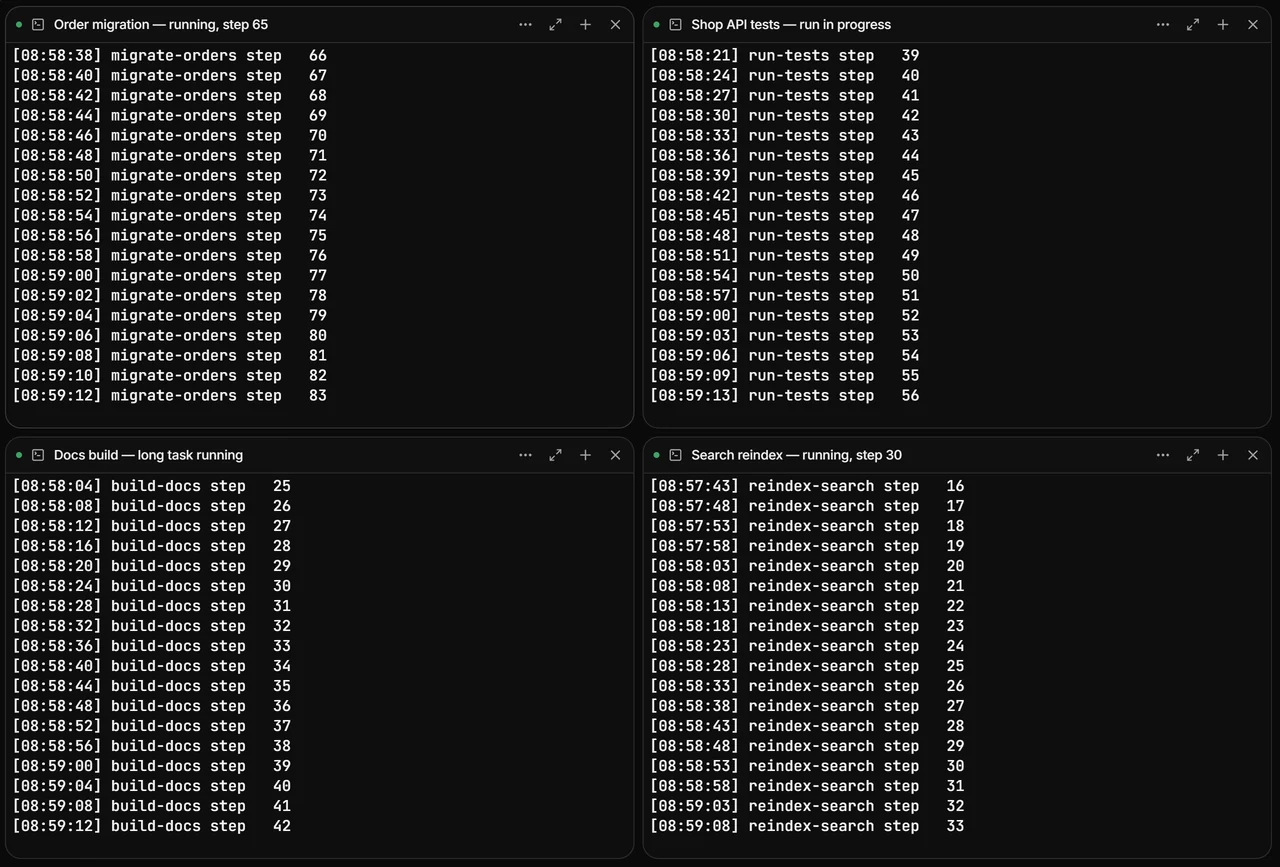
The process ids tell the same story. Before the app closed, the four scripts ran as processes 58352, 59548, 46864 and 25052. With the app closed, all four were still running under the PTY host, and after it reopened they were still the same four. The app’s own status endpoint reported:
{"mode":"host","host_pid":57980,"persistent_enabled":true,"workspaces":3,"live_agents":4}Separate the agent’s lifetime from the window’s lifetime. If you build anything that runs long jobs behind a UI, this is the whole trick: the UI should be something you can throw away.
One day of our own logs
The demo was staged. The logs are not. Every time the app attaches to a running host, it writes one line with the number of terminals it found. This is September 29, the day we opened with.
The app restarted around the agents all day; the host never did
Each dot is one start of the desktop app that re-attached to the running host, placed at how many agents it found still running.
Swipe sideways to see the whole chart.
Show the data
| Time | Agents still running |
|---|---|
| 08:27 | 12 |
| 08:35 | 12 |
| 08:48 | 12 |
| 10:28 | 9 |
| 10:35 | 9 |
| 10:40 | 9 |
| 10:54 | 9 |
| 11:47 | 12 |
| 11:53 | 12 |
| 12:00 | 12 |
| 12:06 | 12 |
| 12:25 | 11 |
| 17:18 | 11 |
| 17:24 | 11 |
| 17:28 | 11 |
| 17:30 | 11 |
| 18:12 | 12 |
| 18:16 | 12 |
| 18:38 | 13 |
| 20:10 | 13 |
| 20:18 | 13 |
| 20:21 | 13 |
| 20:28 | 13 |
| 20:46 | 13 |
Twenty-four starts of the app, one host. The count changes during the day as panes were opened and closed. The host itself ended at 21:56, when the machine was switched off.
Layer two: when the machine restarts
A PTY host cannot survive a reboot, and nothing can: the operating system ends every process. So after a restart there are no agents to re-attach to, and a different mechanism takes over.
While agents run, Jarvis keeps a small restore file next to its settings. For every open workspace it records the folder, the layout, which CLI ran in each pane, on which account, and the id of that pane’s conversation. After a restart, Jarvis starts each agent again on its own conversation, using that CLI’s own resume argument:
| Coding CLI | How Jarvis resumes it |
|---|---|
| Claude Code | --resume <id>, plus Claude Code’s own setting to finish an interrupted turn |
| Codex | resume <id> |
| OpenCode, Kimi Code | --session <id> |
| Grok Build | --resume <id> |
| Antigravity | --conversation <id> |
Claude Code goes one step further. With its CLAUDE_CODE_RESUME_INTERRUPTED_TURN setting, a conversation whose last turn was cut off mid-way runs that turn again by itself. Jarvis turns it on and switches off its age limit, because after a night with the PC off, the unfinished turn is still the one you asked for. Other CLIs reopen their conversation and wait at their prompt. Jarvis never types into them.
This is what the log said this morning, at 07:55, three minutes after the PC booted:
Agentic IDE resumed 2 workspace(s), 13 terminal(s); 0 skipped
Agentic IDE: resuming 13 agent(s) on their own conversations — the machine restarted or the terminal host ended
We wanted to see that happen on screen too, so we ran the experiment behind it ourselves. We gave a Claude Code agent (Haiku 4.5) a task with 30 steps: write 30 small files, one at a time. After 19 files, we killed the PTY host outright. To the agents, that is the same as the power going off. Jarvis noticed the host was gone, started a new one, and resumed every pane.
After a simulated power cut: the shells start over, the agent picks up where it was
Four plain terminals and one Claude Code agent, after the host holding them was killed at file 19 of 30.
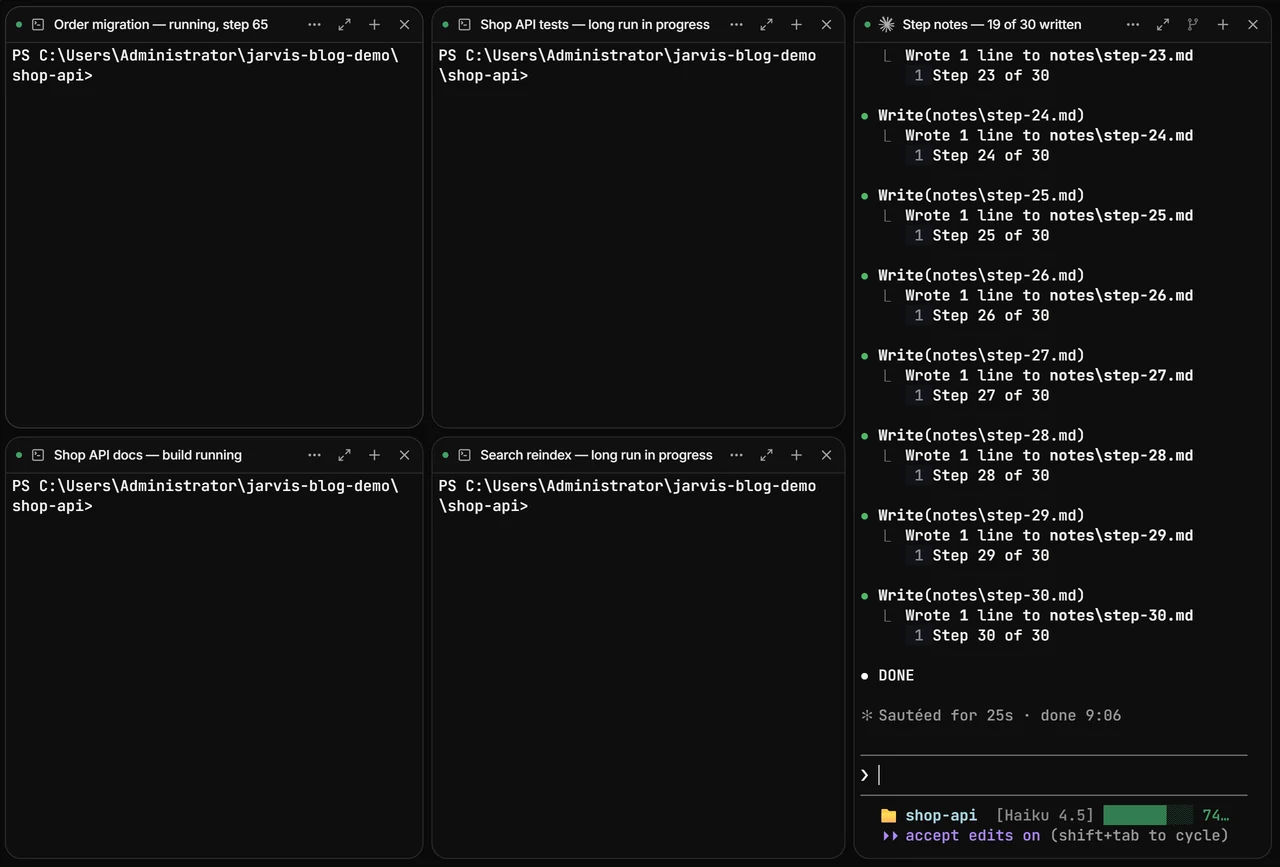
That screenshot is the clearest way to see the difference between the two layers. A plain shell has nothing to resume: its work lived only in the process, and the process is gone. An agent keeps its work in a conversation, so it can come back.
It did not go perfectly. When the resumed Claude Code started, it first showed a one-time notice of its own about browser tools, and waited there. Jarvis marked the pane Needs input, and after one press of Enter the agent carried on and finished all 30 files within 25 seconds.
What the resumed agent waited on
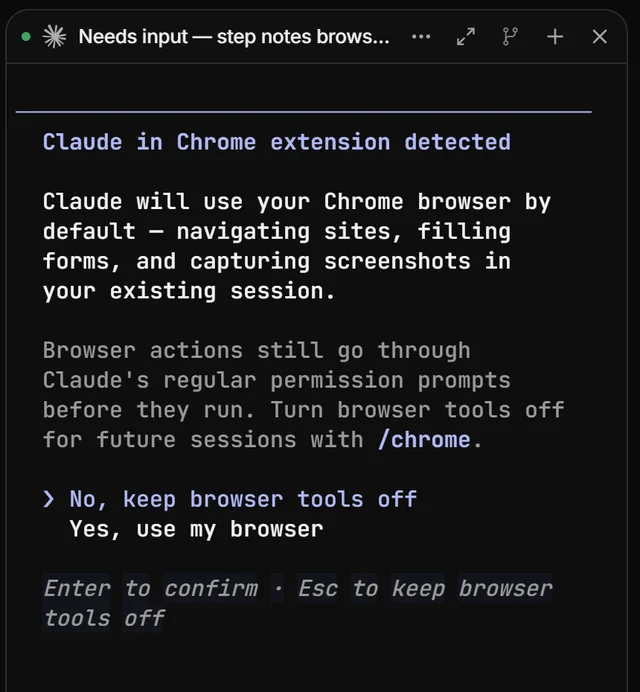
Resume through the CLI’s own mechanism, and show the human when it is waiting. We could have tried to click through such dialogs automatically. We would rather tell you the pane needs you than guess at a question we did not ask.
Keep alive or resume: the difference
| App closed, updated or crashed | PC restarted | |
|---|---|---|
| The agent’s process | keeps running, same process | ends; a new one starts |
| Its screen | replayed exactly as it is | the conversation reloads |
| Work in progress | continues without a pause | Claude Code re-runs the cut-off turn; other CLIs wait at their prompt |
| A plain shell’s job | keeps running | lost; the shell starts fresh |
| What you do | nothing | nothing, unless the CLI asks something |
What broke on the way
Jarvis started a second copy of an agent that was already running. The app turns the PTY host on during startup. In the first version it was switched on a moment too late: the grid attached its first pane before the switch, started that pane’s agent inside the app, and the agent the host had kept alive went on unseen next to it (September 28). Now the host is switched on before the app answers anything, in a module that imports nothing, so switching it on costs no startup time.
A restart was mistaken for a reboot. The same evening, at 19:21, the app could not reach a host that was still alive and treated it as gone. The app resumed every agent a second time, next to the living ones, and one of them received a stray “continue”. Two changes came out of that. “Rebooted” is now measured, not guessed: the host records the machine’s boot time, and a host that is alive in the current boot but silent means “wait and re-join”, never “start again”. And Jarvis stopped typing “continue” into panes altogether; resuming is left to each CLI’s own mechanism.
Closing a workspace deleted its restore point. An earlier version of the restore file forgot a workspace as soon as you closed it, on the theory that re-offering something you just closed is noise. That was wrong. Closing for the day and picking the same folders up tomorrow is the main thing it is for. Now only an explicit Start fresh discards a restore point.
If you run agents yourself
- Nothing to switch on. Both layers are on by default. Close the app whenever you like; your agents keep working.
- Close panes, not the app, to stop agents. Closing a pane or a workspace is what ends its agent. Closing the window only detaches.
- Prefer agents over bare shell jobs for long work. An agent’s work survives a reboot through its conversation; a script in a plain shell does not.
- Glance at “Needs input” after a restart. A resumed CLI can stop at a question of its own. Jarvis shows which panes are waiting.
Tell us if an agent of yours ever does not come back: open an issue on GitHub with the time it happened.
How we tested. Figures 1, 2, 4 and 5 are screenshots of the Personal Jarvis desktop app (2.3, Windows 11), taken in a separate demo workspace in a demo folder so that no real project is shown; the scripts in figures 1 and 2 print numbered lines and do nothing else. For figure 4 the PTY host was ended with a hard kill while the app kept running, which is how the host sees a power cut; the agent was Claude Code 2.1.284 on Haiku 4.5. Figure 3 and the morning log lines come from the desktop log of the machine Jarvis is built on, September 29 and 30, 2026. Keeping agents alive is verified live on Windows; on macOS and Linux the same code path runs through the same tests, but we have not yet repeated the live test there. The packaged desktop installer builds cannot start the PTY host yet, so there terminals still end with the app; resuming after a restart works in every install once the app starts again.